
[vc_row][vc_column width=”1/1″][vc_raw_html]JTNDc3BhbiUyMHN0eWxlJTNEJTIyYmFja2dyb3VuZCUzQSUyM2Y0NTI0ZCUzQiUyMGNvbG9yJTNBJTIzZmZmZmZmJTNCJTIwcGFkZGluZyUzQThweCUzQiUyMGJvcmRlci1yYWRpdXMlM0E0cHglMjIlM0UlM0NpJTIwY2xhc3MlM0QlMjJpY29uLWNhbGVuZGFyJTIyJTNFJTNDJTJGaSUzRSUyMCUzQ2IlM0UlM0N1JTNFUkVMRUFTRSUyMERBVEUlM0MlMkZ1JTNFJTNDJTJGYiUzRSUzQSUyMEZlYnJ1YXJ5JTIwMyUzQ3N1cCUzRXJkJTNDJTJGc3VwJTNFJTIwMjAyNCUzQyUyRnNwYW4lM0U=[/vc_raw_html][vc_column_text]Release Notes – CAST Highlight Winter 2024 Release[/vc_column_text][vc_empty_space][vc_column_text]
We’re very proud to announce the next major release of CAST Highlight, the software intelligence product that acts as a control tower for your application portfolio. This version introduces new innovations including: CO2 Emission Estimator (beta), Cloud Migration Wave Advisor, a brand new UI for the Code Reader, and many other new capabilities.
[/vc_column_text][vc_btn title=”Try now” style=”flat” color=”black” size=”lg” link=”url:https%3A%2F%2Flearn.castsoftware.com%2Ftrial-hl-request|||”][vc_btn title=”Getting Started Guide” style=”outline” color=”black” size=”lg” link=”url:http%3A%2F%2Fdoc.casthighlight.com%2FGetting-Started-Guide.pdf|||”][vc_empty_space][vc_separator][/vc_column][/vc_row][vc_row padding_top=”0″][vc_column width=”1/2″][vc_single_image image=”9620″ onclick=”img_link_large” img_size=”full” alignment=”center”][/vc_column][vc_column width=”1/2″][vc_column_text]
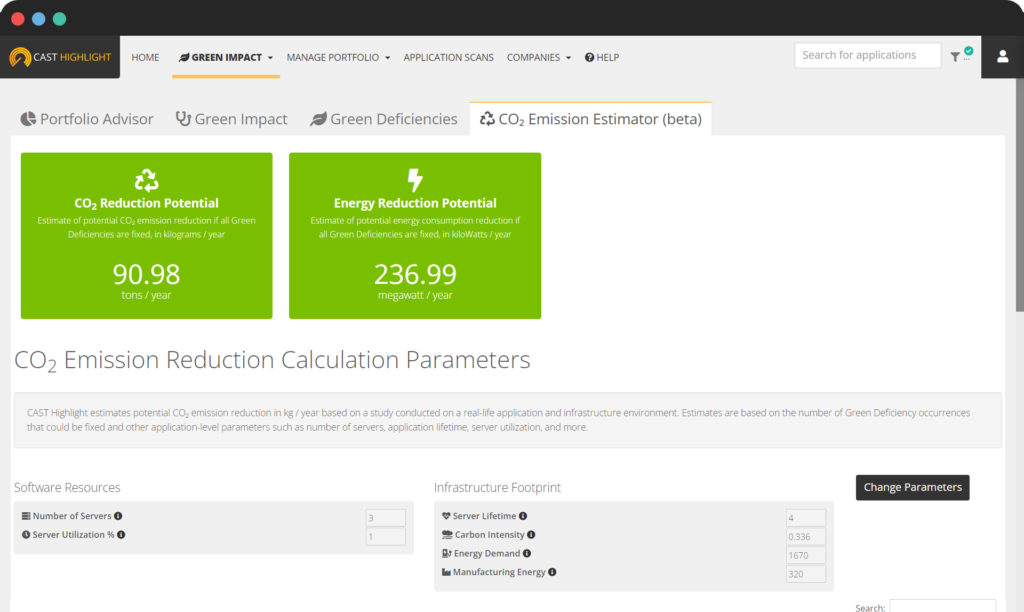
CO₂ Emission Estimator (beta)
Get more tangible and actionable Green Software Insights including estimates on the potential reduction in CO2 emissions and energy consumption if Green Deficiencies are fixed across an application portfolio. In this beta version, calculations are based on a combination of automatically generated insights and user-configurable parameters such as the number of servers, server utilization, energy demand, and more.
Learn more about Green Insights[/vc_column_text][vc_empty_space][vc_separator][/vc_column][/vc_row][vc_row][vc_column width=”1/2″][vc_single_image image=”9621″ onclick=”img_link_large” img_size=”full” alignment=”center”][vc_empty_space][/vc_column][vc_column width=”1/2″][vc_column_text]
Cloud Migration Wave Advisor
Plan a cloud migration with speed and confidence by getting automated recommendations on the sequence of applications to migrate for optimal results.[/vc_column_text][vc_empty_space][vc_separator][/vc_column][/vc_row][vc_row][vc_column width=”1/2″][vc_single_image image=”9622″ img_size=”full” alignment=”center”][/vc_column][vc_column width=”1/2″][vc_column_text]
Interactive User Guides
Accelerate new user ramp up, application onboarding and new capability education with built-in, interactive product guides that appear directly in the CAST Highlight user interface. New guides will be added on a regular basis.[/vc_column_text][vc_empty_space][vc_separator][/vc_column][/vc_row][vc_row][vc_column width=”1/2″][vc_single_image image=”9623″ img_size=”full” alignment=”center”][/vc_column][vc_column width=”1/2″][vc_column_text]
Improved Code Reader
Streamline application onboarding using the new and improved CAST Highlight Code Reader application. It has a simplified and unified user experience for Windows, Linux and Mac. The Code Reader now also includes the same options as the Command Line (e.g., direct result upload, regular expression support for folder exclusions, etc.).
Try now![/vc_column_text][vc_empty_space][vc_separator][/vc_column][/vc_row][vc_row][vc_column width=”1/2″][vc_single_image image=”9035″ img_size=”full” alignment=”center”][/vc_column][vc_column width=”1/2″][vc_column_text]
Many other feature improvements
The product team also took the opportunity with this new release to introduce many additional enhancements such as: CVE interactive filtering in the dashboard, a dedicated SBOM tab for CVEs, information in the SBOM export, custom segmentation improvements (support for math calculations or use of other segments as part of a segmentation formula), and much more![/vc_column_text][vc_empty_space][vc_separator][/vc_column][/vc_row]