
Upgrading to our new authentication system
Depending on how users sign in to CAST Highlight, there may be an action required from you or your IT team before October 10th 2026. This article explains exactly what to expect.
MINIMAL IMPACT
Local accounts (login/password)
You sign in directly on the CAST Highlight login page.
The transition will be nearly seamless for local account users. You do not need to do anything before the cutover date.
Your data, dashboards, and access rights are fully preserved. Only the mechanism that verifies your password is changing.
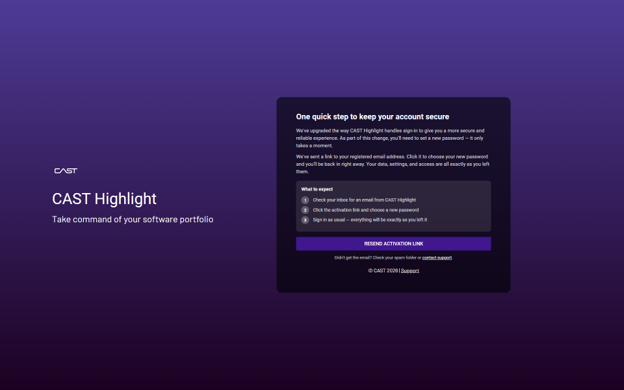
What will happen on your first login after October 10th 2026
- You’ll be redirected to the new sign-in page and asked to set a new password for your account.
- An email will be sent automatically to your registered address with a secure activation link. Check your inbox (and spam folder if needed).
Click the link, choose your new password, and sign in. From that point on, everything works exactly as before. Note that your password will have to comply with our password policy (14-character minimal length, use of lower/upper cases, at least 1 special character).
CONFIGURATION UPDATE REQUIRED
SAML / SSO users
You sign in via your company’s identity provider (Okta, Azure AD, ADFS, etc.).
Because Keycloak becomes the new SAML Service Provider (SP), our SP metadata will change. Your IdP administrator must update the CAST Highlight application in your identity provider before October 10th 2026. End users are not affected once this is done.
Without this update, SSO login will fail after October 10th 2026. Please forward this section to your IT or IdP administrator as soon as possible.
Changes to apply in your IdP:
- Replace the existing SP metadatawith the new metadata file. You can download it from COMPANIES > SAML Management when logged in with a Portfolio Manager user role
- Update the following SP endpoints in your IdP configuration:
— Entity ID: {serverUrl}/auth/realms/hl-portal (e.g., https://rpa.casthighlight.com/auth/realms/hl-portal)
— ACS URL: {serverUrl}/kcauth (e.g., https://rpa.casthighlight.com/kcauth) - Verify attribute mapping.Ensure the following attributes are sent in the SAML assertion:
— [ATTRIBUTE — e.g. email]
— [ATTRIBUTE — e.g. groups / memberOf] - Confirm your NameID format is set to: [NAMEID FORMAT]
- You will be informed in the coming days when the new SAML configuration will be possible on our platforms
Check out our Keycloak Migration Guide for further guidance.
Need help? Reach out at help@castsoftware.com and mention “SAML migration”.
ACTION REQUIRED
Tokens: CLI and API integrations
You automated scan pipelines, scripts, or tools using CAST Highlight user tokens.
Existing API tokens are issued by the current authentication system and will stop working after November 5th 2026. Any automated pipeline, CI/CD job, or script that authenticates using a token will need to be updated. Audit your integrations now. Identify any pipeline or script that uses a CAST Highlight API token and plan your update window.
Recommended approach
- After October 10th 2026, sign in to CAST Highlight, enable (or re-enable) the Token Management feature (from the menu Companies > Token Management)
- Generate a new API token from your profile settings under API access.
- Test the validity of the token with a simple API request (e.g., GET {serverUrl})WS2/domains/{your_domainId})
- Replace the old token in your integrations with the new token.
- Note that login/password and Basic authentications won’t be supported after the cutoff date
Need help with the migration?
Our support team is available throughout this transition. For SAML configuration assistance, API migration questions, contact us at help@castsoftware.com or open a ticket via the support portal. Please include “Authentication migration” in the subject line so we can prioritize your request. In order to speed issue resolution, please share a HAR file.