

Exploring the New Technical Debt Advisor Views in CAST Highlight
The Technical Debt Advisor in CAST Highlight has been redesigned with new views that make it easier to understand, segment, and act on technical debt across your application portfolio. Insights are now grouped in a series of tabs within a single page, giving you multiple perspectives without losing context. This tutorial will guide you through each tab and explain how to interpret the data.
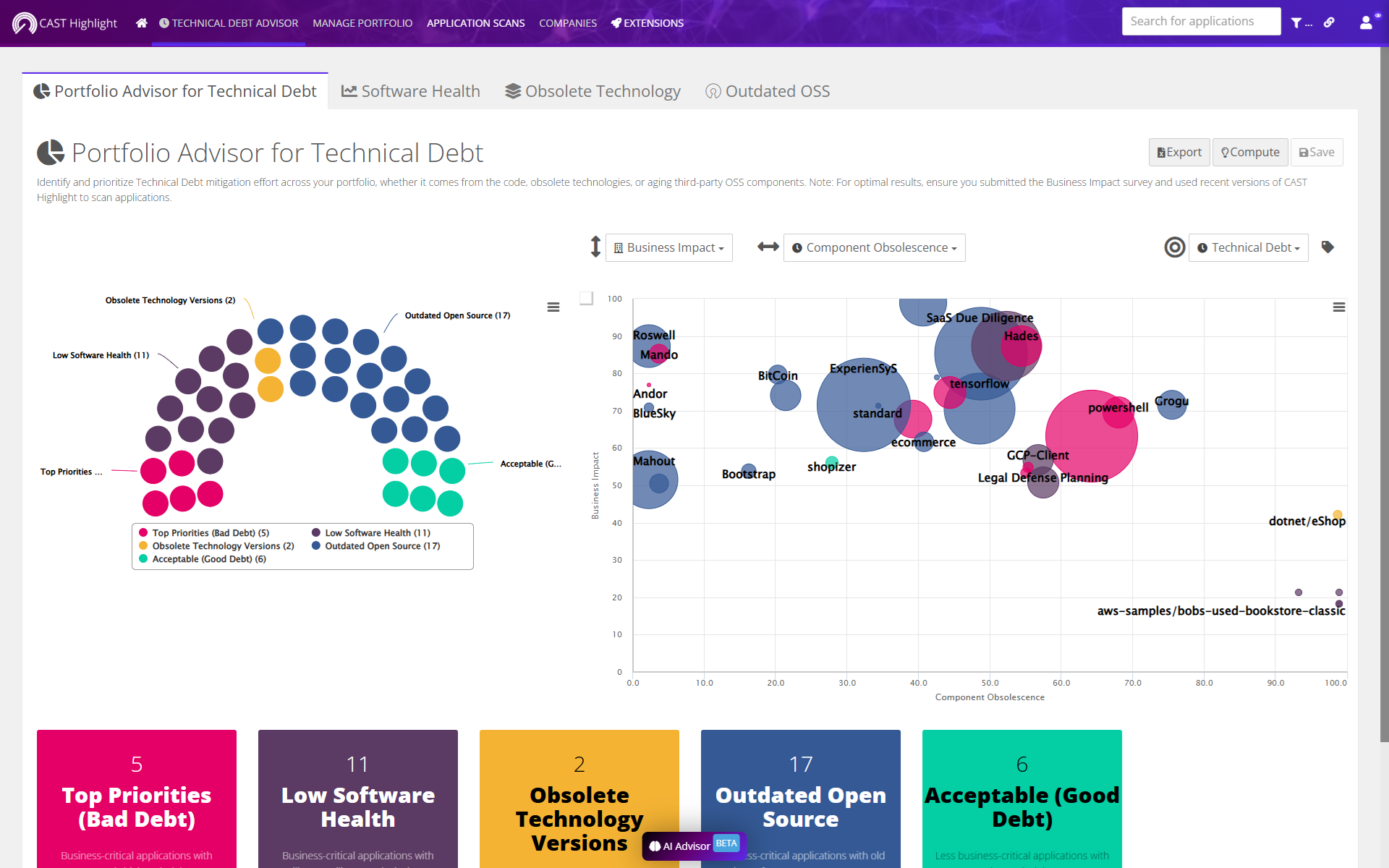
Portfolio Advisor for Technical Debt
This is the entry point into the Technical Debt Advisor. It provides a segmentation of your application portfolio that combines multiple insights into one holistic view.
What you’ll see:
- Software Health indicators
High-level metrics that capture agility, resiliency, and elegance at the application level. - Deprecated technology usage
Detection of outdated frameworks and runtimes (e.g., old .NET versions, JDK versions). - Outdated OSS usage
Applications that are not using the latest versions of open-source components.
How to use it:
- Use this tab to prioritize at the portfolio level. It helps you quickly spot which applications might combine multiple sources of technical debt (e.g., poor software health and reliance on deprecated technology).
- Drill into the applications that appear in multiple risk categories to identify highest-priority modernization candidates.
Software Health
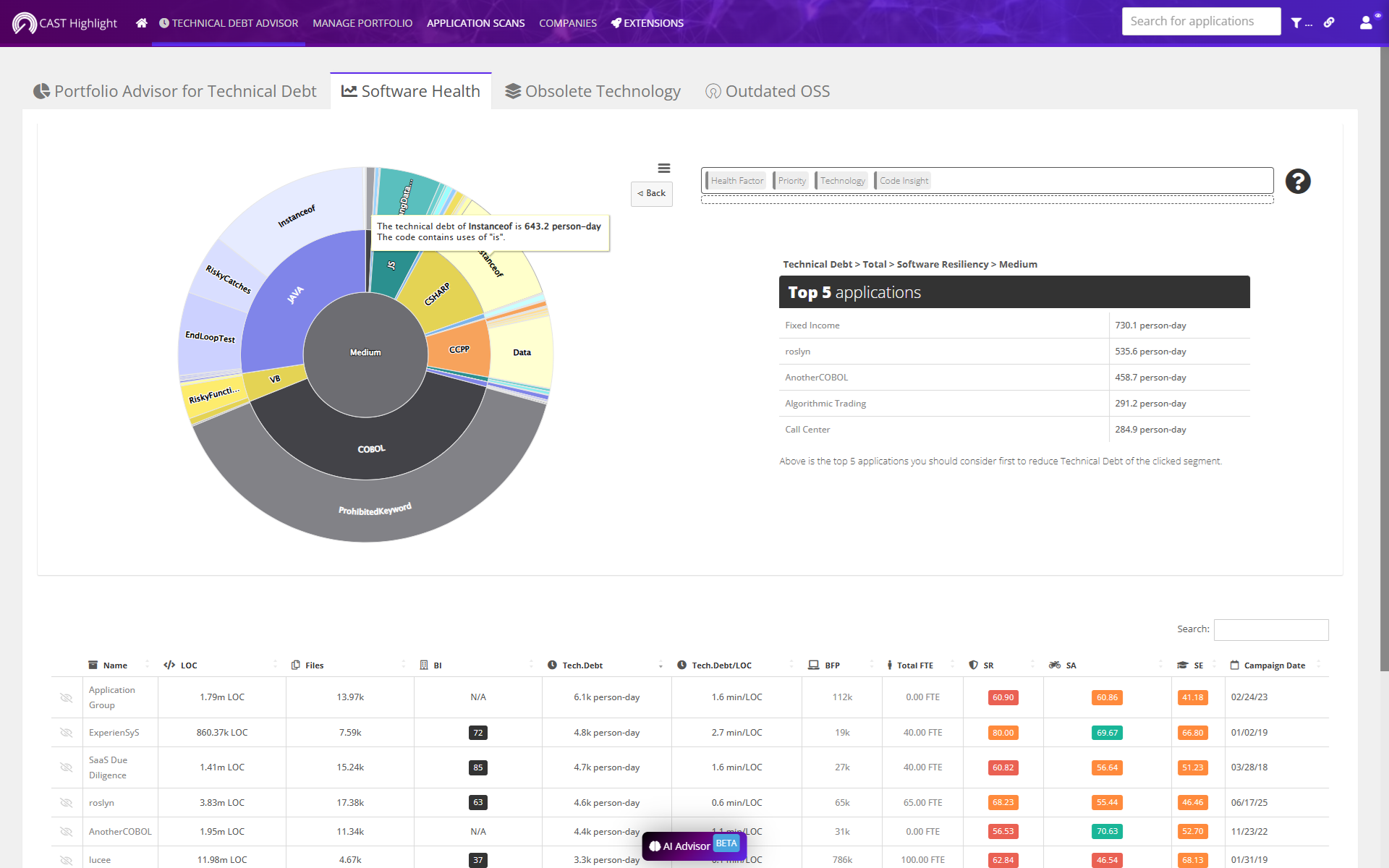
This tab focuses on technical debt effort estimates derived from Code Insights. It gives you a detailed look at how much effort is associated with remediating software health issues.
What you’ll see:
- Technical Debt effort at portfolio level
Quantified based on CAST Highlight’s analysis of:- Software Agility (ease of change, modularity)
- Software Resiliency (robustness against failure)
- Software Elegance (simplicity and maintainability of the codebase
- Origin of Technical Debt visualization
Graphical breakdown showing where the debt comes from. - Top 5 applications for any clicked segment
When you explore a segment (e.g., resiliency issues), you’ll immediately see which applications contribute most to that issue.
How to use it:
- Identify the biggest drivers of technical debt in your portfolio.
- Focus on the Top 5 offenders per category to maximize remediation impact.
- Use the breakdown to communicate with stakeholders about the type of debt (resiliency vs. agility vs. elegance).
Obsolete Technology
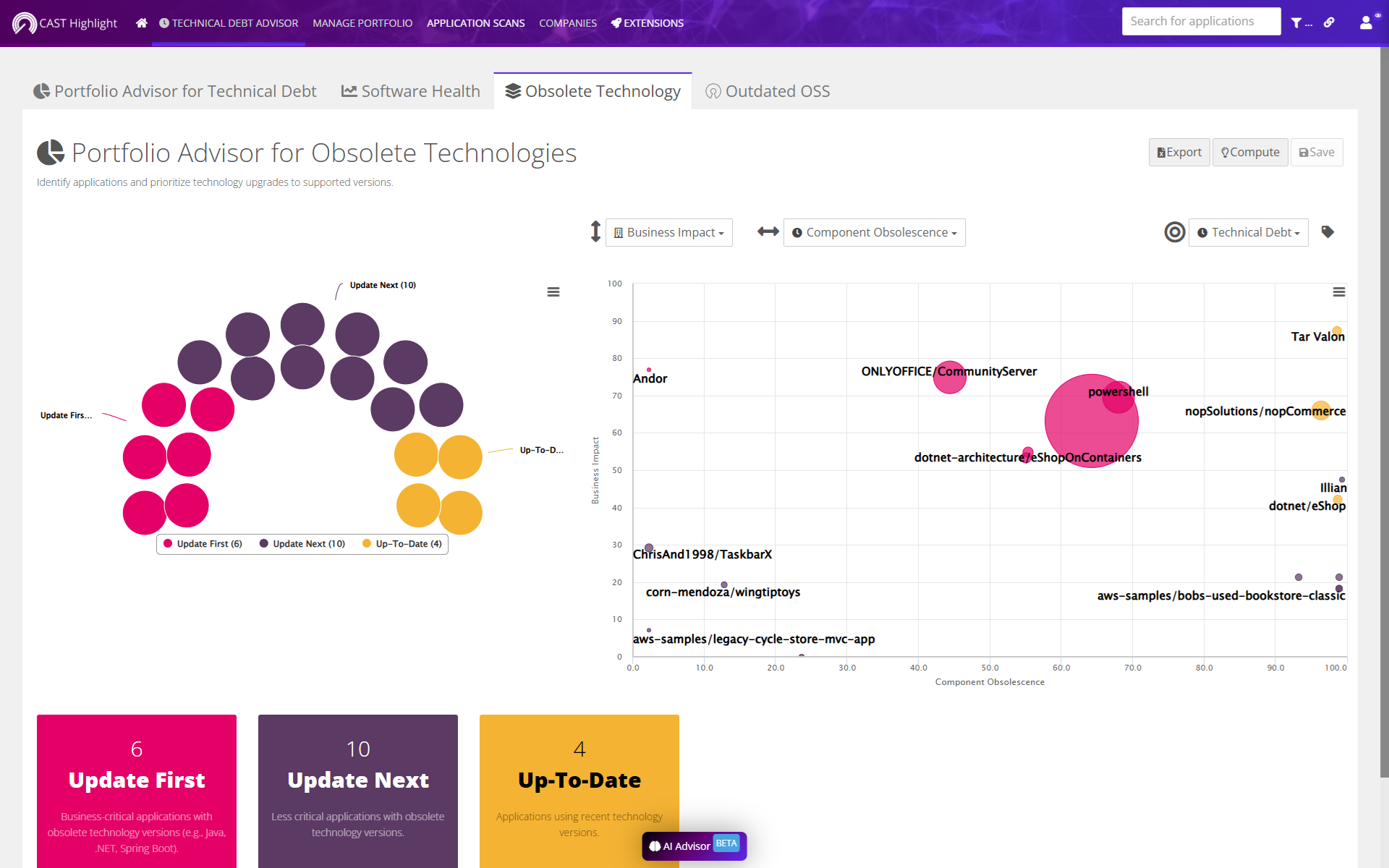
This tab highlights applications that rely on deprecated versions of key technologies such as .NET, .NET Core, JDK, or frameworks like Spring Boot.
What you’ll see:
Applications are grouped into three segments:
- Update First – Business-critical applications running obsolete technology versions.
- Update Next – Less critical applications on obsolete versions.
- Up-To-Date – Applications already using recent, supported versions.
How to use it:
Use this view to prioritize upgrades:
- Start with Update First for maximum business impact.
- Plan Update Next as part of medium-term modernization efforts.
- The Up-To-Date segment reassures stakeholders that parts of the portfolio are aligned with supported technologies.
Outdated OSS
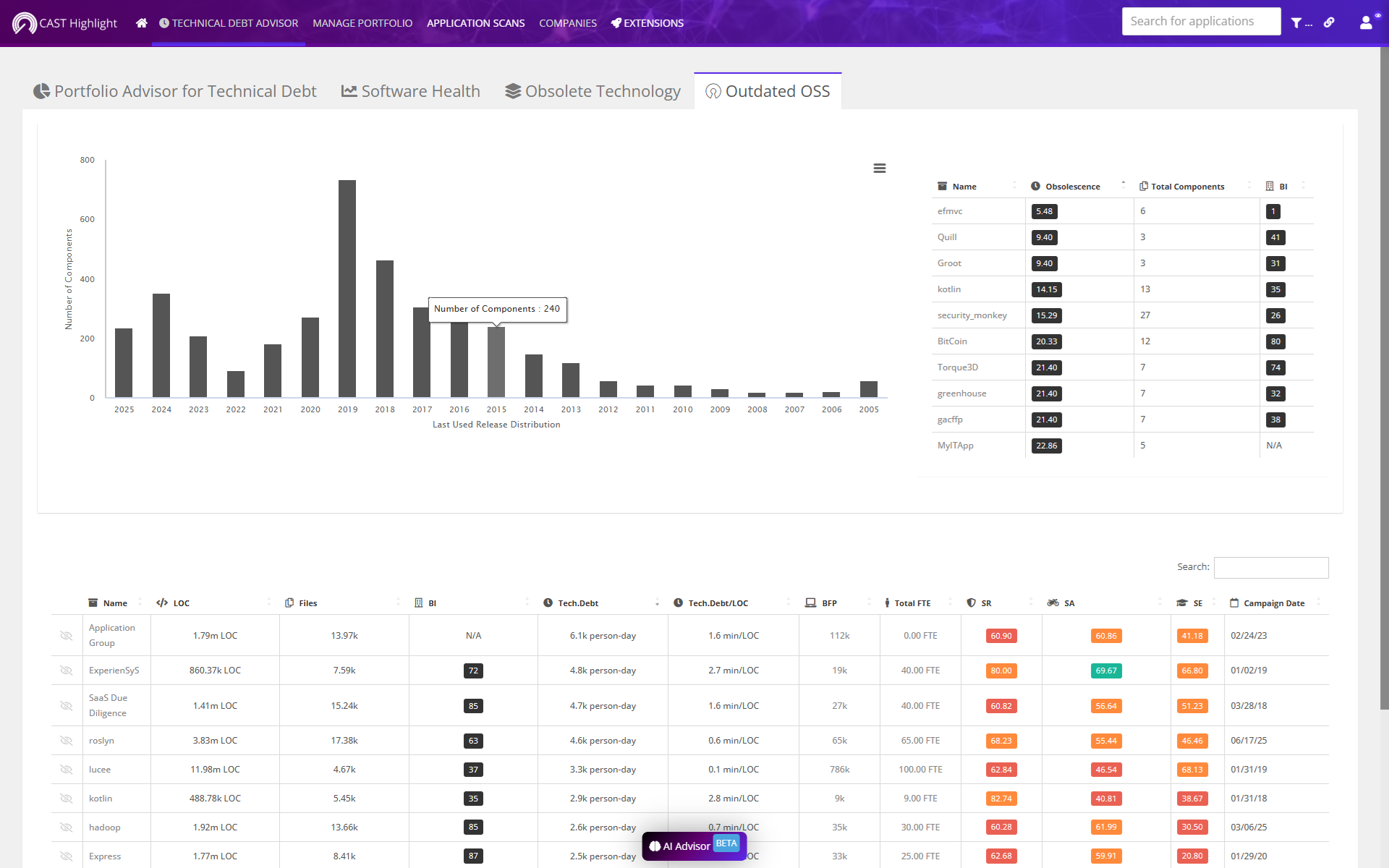
This tab provides insights into the age of open-source components used across your portfolio.
What you’ll see:
A column chart shows OSS usage aggregated by release year. Each bar represents the age of OSS components.
For instance, a tall bar in 2015 means many components in your applications are still running on versions released in 2015. Clicking on a year drills down to show which applications are using components from that release year.
How to use it:
- Quickly spot if your portfolio is heavily reliant on outdated OSS (older release years).
- Prioritize applications using very old versions that may carry security or support risks.
- Build a remediation plan to progressively update OSS dependencies.
Putting It All Together
The new Technical Debt Advisor tabs let you approach portfolio modernization from multiple angles:
- Tab 1 (Portfolio Advisor): A global view combining software health, deprecated technology, and OSS usage.
- Tab 2 (Software Health): Deep dive into technical debt effort estimates and top offenders.
- Tab 3 (Obsolete Technology): Focus on runtime/framework modernization priorities.
- Tab 4 (Outdated OSS): Analyze and reduce risks from outdated open-source libraries.
By switching between these tabs, you can move seamlessly from a strategic overview to tactical actions, ensuring technical debt is managed in a way that balances risk, cost, and business impact.
Note that in order to see Obsolete Technology insights in the dashboards, applications must be scanned with version 5.9.11 or above.
Technology versions are detected from these files:
- JDK/Springboot: pom.xml, build.gradle, build.xml
- .Net, .NET Framework, ASP.Net, .NET Core: .csproj
Supported technologies at a glance for obsolete technology detection
The analyzer reads 5 file types: pom.xml, build.gradle, build.xml, *.csproj and *.vbproj. It also uses gradle.properties to resolve version variables.
| Technology | Label reported | Files checked | Where the version is read | Master techno required |
|---|---|---|---|---|
| Java (JDK) | JDK |
pom.xml (Maven) |
<properties>: java.version, maven.compiler.source, maven.compiler.target, maven.compiler.release; maven-compiler-plugin <configuration>: release, source, target |
Any |
| Java (JDK) | JDK |
build.gradle (Gradle, Groovy DSL) |
sourceCompatibility, targetCompatibility, languageVersion = JavaLanguageVersion.of(…) |
Java, Kotlin, Groovy, Scala, CCpp, JS |
| Java (JDK) | JDK |
build.xml (Ant) |
source / target attributes of <javac … /> inside <target name="compile"> |
Any |
| Spring / Spring Boot | Springboot |
pom.xml |
<org.springframework.version> property; <dependency> with artifactId spring-boot-starter-parent or spring-boot-dependencies |
Any |
| Spring / Spring Boot | Springboot |
build.gradle |
classpath("group:artifact:version") in buildscript { dependencies { … } }, where the coordinates contain springframework, spring-boot-starter-parent or spring-boot-dependencies |
Java, Kotlin, Groovy, Scala, CCpp, JS |
| .NET Framework | .NET framework |
*.csproj, *.vbproj |
<TargetFramework(s)> TFMs net11 to net481, or <TargetFrameworkVersion> (e.g. v4.7.2) |
CS, VbDotNet |
| .NET 5+ | .NET |
*.csproj, *.vbproj |
<TargetFramework(s)> TFMs such as net6.0, net8.0, dotnet5x |
CS, VbDotNet |
| .NET Core | .NET core |
*.csproj, *.vbproj |
<TargetFramework(s)> TFMs netcoreapp1.0 to netcoreapp3.1 |
CS, VbDotNet |
| .NET Standard | .NET standard |
*.csproj, *.vbproj |
<TargetFramework(s)> TFMs netstandardX.Y |
CS, VbDotNet |
| ASP.NET (legacy DNX) | ASP.NET |
*.csproj, *.vbproj |
<TargetFramework(s)> TFMs aspnet50, aspnetcore50, dnx…, dnxcore50 |
CS, VbDotNet |
| Windows Store | Windows Store |
*.csproj, *.vbproj |
<TargetFramework(s)> TFMs netcore45, netcore451, netcore50 |
CS, VbDotNet |
File names are matched case-insensitively. Any other TFM (for example uap10.0, monoandroid) is reported with its raw name as the label.
Leave a Reply