
Release Notes – CAST Highlight October 2020
[vc_row][vc_column width=”1/1″][vc_raw_html]JTNDc3BhbiUyMHN0eWxlJTNEJTIyYmFja2dyb3VuZCUzQSUyM2Y0NTI0ZCUzQiUyMGNvbG9yJTNBJTIzZmZmZmZmJTNCJTIwcGFkZGluZyUzQThweCUzQiUyMGJvcmRlci1yYWRpdXMlM0E0cHglMjIlM0UlM0NpJTIwY2xhc3MlM0QlMjJpY29uLWNhbGVuZGFyJTIyJTNFJTNDJTJGaSUzRSUyMCUzQ2IlM0UlM0N1JTNFUkVMRUFTRSUyMERBVEUlM0MlMkZ1JTNFJTNDJTJGYiUzRSUzQSUyME9jdG9iZXIlMjAyNCUzQ3N1cCUzRXRoJTNDJTJGc3VwJTNFJTIwMjAyMCUzQyUyRnNwYW4lM0U=[/vc_raw_html][vc_column_text]
We’re very proud to announce the next major release of CAST Highlight, the Software Intelligence solution for performing rapid application portfolio analysis. This new version brings new technology coverage for health and cloud, better support for CVE lifecycle management and many other feature improvements.
[/vc_column_text][vc_btn title=”Try now” style=”flat” color=”black” size=”lg” link=”url:https%3A%2F%2Flearn.castsoftware.com%2Ftrial-hl-request|||”][vc_btn title=”Getting Started Guide” style=”outline” color=”black” size=”lg” link=”url:http%3A%2F%2Fdoc.casthighlight.com%2FGetting-Started-Guide.pdf|||”][vc_empty_space][vc_separator][/vc_column][/vc_row][vc_row padding_top=”0″][vc_column width=”1/3″][vc_single_image image=”8848″ onclick=”img_link_large” img_size=”full” alignment=”center”][/vc_column][vc_column width=”2/3″][vc_column_text]
Kotlin Support for Health Insights
This new version of CAST Highlight introduces 30+ software health patterns for the Kotlin language. Adopted by tech companies such as Google, Atlassian, Pinterest and Pivotal, Kotlin is one of the fastest-growing programming languages, as an alternative to Java.[/vc_column_text][vc_empty_space][vc_separator][/vc_column][/vc_row][vc_row][vc_column width=”1/3″][vc_single_image image=”8849″ img_size=”full” alignment=”center”][/vc_column][vc_column width=”2/3″][vc_column_text]
SWIFT Support for Cloud Maturity
CAST Highlight is continuously adding new patterns and technologies for Cloud readiness assessments. This version comes with 20+ Cloud Maturity patterns for SWIFT, Apple’s mobile-oriented programming language for iOS, MacOS, tvOS, etc.[/vc_column_text][vc_empty_space][vc_separator][/vc_column][/vc_row][vc_row][vc_column width=”1/3″][vc_single_image image=”8850″ img_size=”full” alignment=”center”][/vc_column][vc_column width=”2/3″][vc_column_text]
CVE Lifecycle Management
CAST Highlight now saves vulnerability (CVE) status, indicates whether there are new CVEs in the most recent scan, and enables exclusions along with documentation notes on the reasons for exclusion.
More information on this feature[/vc_column_text][vc_empty_space][vc_separator][/vc_column][/vc_row][vc_row][vc_column width=”1/3″][vc_single_image image=”8851″ img_size=”full” alignment=”center”][/vc_column][vc_column width=”2/3″][vc_column_text]
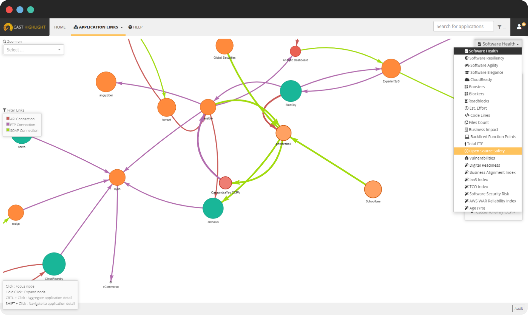
Application Links improvements
The Application Links dashboard has been updated with a number of new visualization capabilities such as: application bubble color coding by health insights or vulnerability severity, bubble size selector for custom indicators, and more.
More information on this feature[/vc_column_text][vc_empty_space][vc_separator][/vc_column][/vc_row][vc_row][vc_column width=”1/3″][vc_single_image image=”8852″ img_size=”full” alignment=”center”][/vc_column][vc_column width=”2/3″][vc_column_text]
Event Log Reporting
For security and audit purposes, event logs for a portfolio are now available to Portfolio Managers and can be exported for further analysis.[/vc_column_text][vc_empty_space][vc_separator][/vc_column][/vc_row][vc_row][vc_column width=”1/3″][vc_single_image image=”8853″ img_size=”full” alignment=”center”][/vc_column][vc_column width=”2/3″][vc_column_text]
Custom Indicator Coloring
It is now possible to define colors (green, orange, red) for custom indicators based on specific, customizable score thresholds. These colors are reflected in tiles, data tables and bubble charts to make result interpretation more intuitive.
More information on this feature[/vc_column_text][vc_empty_space][vc_separator][/vc_column][/vc_row][vc_row][vc_column width=”1/3″][vc_single_image image=”8854″ img_size=”full” alignment=”center”][/vc_column][vc_column width=”2/3″][vc_column_text]
Campaign Creation Assistant
The campaign creation process is now even easier with the ability to find portions of an application portfolio that have never been scanned, not scanned recently, have missing survey answers, or any combination of the above.[/vc_column_text][vc_empty_space][vc_separator][/vc_column][/vc_row][vc_row][vc_column width=”1/3″][vc_single_image image=”8855″ img_size=”full” alignment=”center”][/vc_column][vc_column width=”2/3″][vc_column_text]
Keyword Scan RegExp support
The keyword scan feature now supports regular expressions which helps you configure more complex string and pattern searches. This feature is particularly useful to detect possible PII data manipulation across an entire portfolio.[/vc_column_text][vc_empty_space][vc_separator][/vc_column][/vc_row]